 orohi
77c6f0dab7
orohi
77c6f0dab7
Connect and disconnect via official nordvpn CLI from Settings with optional country/city, alongside Cloudflare WARP.
Amnezia Web Panel
A modern, high-performance web interface for managing AmneziaWG, Classic WireGuard, Xray (XTLS-Reality), Hysteria 2, NaiveProxy, Telemt (Telegram MTProxy), Cloudflare WARP, NordVPN, AmneziaDNS, AdGuard Home, SOCKS5, and NGINX + Let's Encrypt services on remote Ubuntu servers — from a single dashboard. Designed to provide a premium user experience with robust administrative capabilities.
🔄 Compatibility with Official Amnezia Client
This panel is fully compatible with the official Amnezia applications!
How to connect an existing server:
- Add your pre-configured server by entering its IP address, login and password
- Go to the "Added Servers" section
- Wait for the automatic server verification
- The panel will automatically detect:
- ✅ Installed protocols
- ✅ Existing users
- ✅ Current configuration
⚡ After verification, you can manage the server directly from the panel!
⚠️ Legal Notice
This project is created solely for educational and research purposes.
This project has never been intended for use in jurisdictions where the technologies employed are prohibited. The author bears no responsibility for any unlawful use of this software.
This project merely adds an abstraction layer for managing publicly available applications. All applications belong to their respective owners. This project does not claim ownership over, nor does it modify, any third-party applications.
The use of traffic obfuscation tools may violate the laws of your country. Only use this software for lawful purposes, such as:
- Penetration testing and security research
- CTF (Capture The Flag) competitions
- Academic and scientific research
- Testing and securing your own networks
- Improving defensive security measures
- Educational training in cybersecurity
Nothing in this project constitutes an incitement to violate any applicable laws.
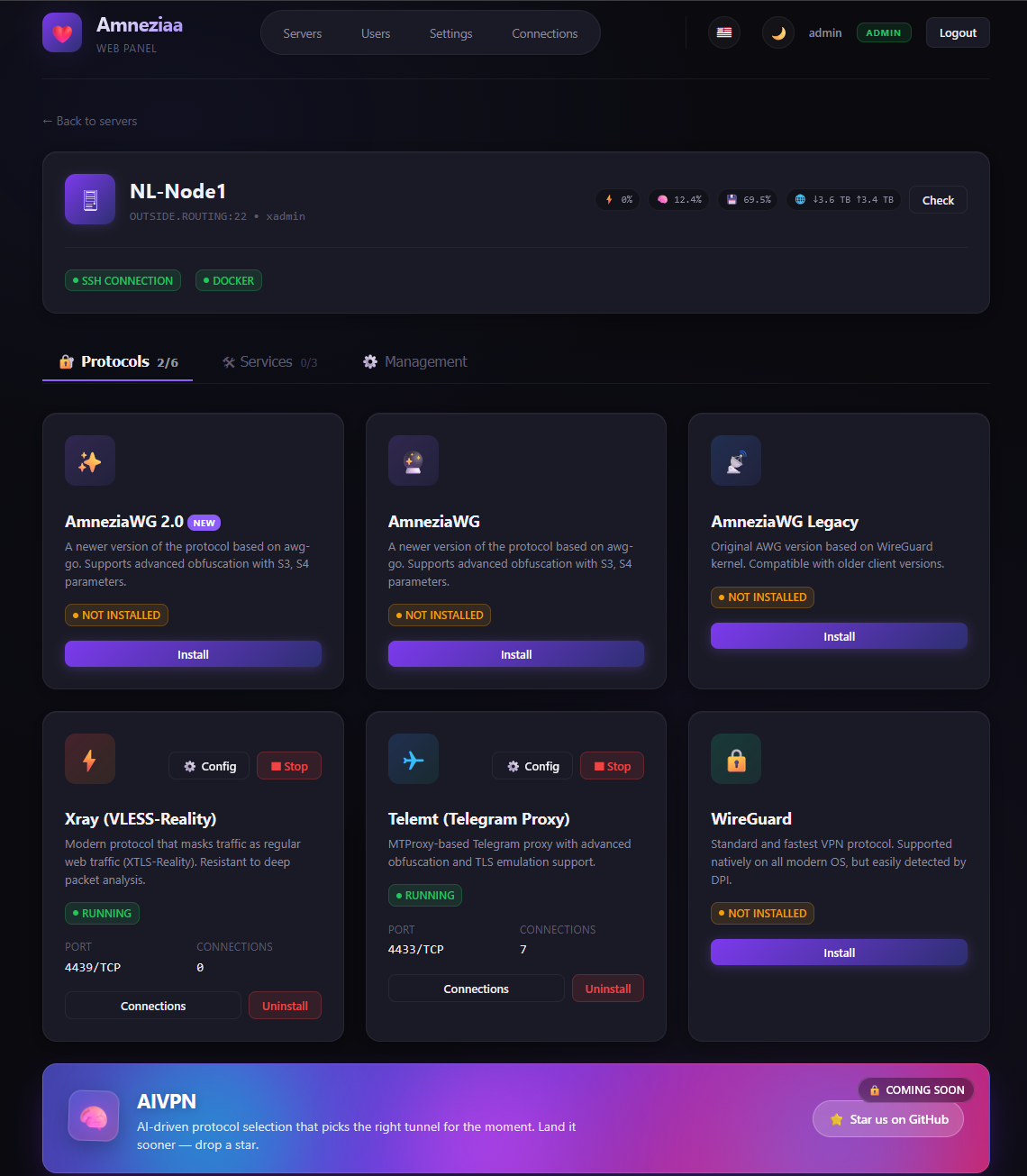
Additional Sections
👥 Users Management (click to expand)
User management interface with permissions and access controls:

⚙️ System Settings (click to expand)
Configuration panel for system parameters and preferences:

🚀 Key Features
- ⚡ VPN Protocols:
- AmneziaWG (AWG / AWG 2.0 / AWG Legacy): Advanced WireGuard-based protocol with S3/S4 obfuscation to bypass deep packet inspection (DPI). Three coexisting variants — modern AWG 2.0 with full junk-packet masking, and a legacy variant for older clients.
- Classic WireGuard: Standard, high-performance WireGuard protocol for unmatched speed and broad device compatibility with traffic monitoring support.
- Xray (XTLS-Reality): Stealthy protocol that masks VPN traffic as standard HTTPS browsing. Pinned to Xray-core v26.x; transparently reads both the panel layout (
meta.json+clientsTable.json) and the native Amnezia client layout (xray_*.keyfiles +clientsTable), so a node first installed via the official mobile/desktop app can be attached to the panel without re-installation. - Hysteria 2: QUIC/HTTP3 proxy from apernet/hysteria via
tobyxdd/hysteria:v2— Let's Encrypt TLS, salamander obfuscation, password auth,hy2://share links. Per-server SSL domain/email defaults, renew from settings; install requires free TCP 80 and 443. - NaiveProxy (stable): HTTPS/HTTP2 camouflage proxy via klzgrad/naiveproxy (Caddy + klzgrad/forwardproxy naïve fork). ACME TLS on the domain, per-client basic auth,
naive+https://share links. Requires free TCP 80 and 443. Use Karing as the client — do not use v2rayN; other clients are untested. - Telemt (Telegram MTProxy): High-performance Telegram MTProxy with TLS emulation and comprehensive management (quotas, IP limits, real-time session tracking). Robust install path that auto-configures Docker's official apt/yum repository when needed.
- Cloudflare WARP: Add and manage WARP-powered connectivity from the panel for routing and network flexibility.
- NordVPN: Connect/disconnect outbound NordVPN from Settings via the official CLI (optional country/city).
- 🛠 Services:
- AmneziaDNS: Internal DNS resolver on a private docker network (
amnezia-dns-net, IP172.29.172.254) to prevent DNS leaks and blockings. - AdGuard Home: DNS-based ad blocker with a web admin UI. Two install modes: Replace AmneziaDNS (takes its IP, all VPN clients use AdGuard immediately) or Side-by-side (parallel deployment on
172.29.172.253, web UI accessible only over the VPN by default). Optional opt-in checkboxes to expose the web UI / DoT / DoH on the host. - SOCKS5 Proxy: Single-account 3proxy-based SOCKS5 server modelled after the official Amnezia client. Auto-generated 16-character password on install, port and credentials editable later from the panel without re-install.
- NGINX + Let's Encrypt: Reverse-proxy and HTTPS automation with certificate management for secure public endpoints.
- AmneziaDNS: Internal DNS resolver on a private docker network (
- ⚙️ Core Server Management:
- Add / Edit / Delete / Reorder server entries — drag-and-drop reorder updates
server_idreferences in saved connections automatically. - Per-server SSL defaults: optional domain + Let's Encrypt email on each server, pre-filled when installing Hysteria or NGINX.
- Live ping indicator next to each server name — non-blocking TCP-connect probe to the SSH port, runs on the asyncio loop in parallel for all servers.
- Clear server wipes every Amnezia-related container, image and
/opt/amneziadirectory in a single sudo script — works for any current or futureamnezia-*protocol. - Reboot the server directly from the UI.
- Strictly concurrent protocol status polling — all supported protocols/services checked in parallel for immediate feedback.
- Asynchronous Processing: Resilient, non-blocking background architecture prevents the UI panel from freezing, even if remote endpoints hang.
- Add / Edit / Delete / Reorder server entries — drag-and-drop reorder updates
- 🧩 Marketplace & Templates:
- Market templates provide quick presets for installing and configuring supported protocols and services (including Hysteria 2).
- Multi-protocol management lets you run and control multiple protocol instances on the same server.
- 🌐 Internationalization (i18n):
- Full support for English, Russian, French, Chinese, and Persian.
- Native RTL (Right-to-Left) support for Persian language.
- 🔄 Auto-update:
- Settings → About checks releases on git.evilfox.cc and can install the latest tag via git + restart (when the panel runs from a git checkout).
- 🌍 Tunnels & outbound VPN:
- Cloudflare Quick Tunnel and ngrok expose the local panel to the internet.
- Cloudflare WARP and NordVPN route the host outbound (no public panel URL).
- 👥 Advanced User Management:
- Role-based access (Admin, Support, Regular User).
- Traffic limits, status monitoring, and account expiration.
- One-click user enabling/disabling.
- 🎨 Premium UI/UX:
- Stunning glassmorphism design.
- Dynamic Dark/Light mode transition.
- Fully responsive for mobile and desktop.
- 🤖 Telegram Bot Integration:
- Notify users about new connections or limits.
- Integrated management via Telegram commands.
- Admin-role workflows for managing servers, protocols, users, and connections directly from Telegram.
- 🔄 Built-in Update Checker:
- View your current panel version directly in Settings.
- One-click check for fresh GitHub releases to stay up to date.
- 📤 Data Interoperability:
- Remnawave Sync: Automatically import and sync users from Remnawave.
- Simple Backup: Effortless JSON-based export and restore of all panel data.
- Backup / Migrate protocols (Alpha): Move protocol configurations between nodes for maintenance, recovery, and migration workflows.
- 🔗 Public Sharing:
- Generate password-protected links for users to download their configurations without panel access.
- 🌍 One-click Public Tunnels:
- Open the local panel to the internet from
/settingsusing Cloudflare Quick Tunnel or ngrok. - Shows the local server URL, installation state, running state, and issued public HTTPS URLs directly in the UI.
- Supports one-click install, enable, stop, and delete for panel-managed tunnel binaries.
- Persists tunnel PID/public URL state across panel restarts and can detect already running tunnel processes.
- Works on Windows, Linux, and Docker-friendly environments;
TUNNEL_BIN_DIRandTUNNEL_STATE_FILEcan override binary/state locations.
- Open the local panel to the internet from
- 🔑 API Tokens for External Integrations:
- Issue bearer tokens from
/settingsfor CI bots, monitoring, or any third-party service. - Panel never stores the raw token — only its SHA-256 hash. The full value is shown once at creation; lose it and you must rotate.
- Tokens inherit the role of the admin who created them and are revoked automatically if that user is disabled or demoted.
- Send
Authorization: Bearer <token>with any admin endpoint — every endpoint that accepts a session also accepts a token, no other changes.
- Issue bearer tokens from
💡 Need Additional Functionality?
If you require any custom features not currently available in the panel, let us know – we'll implement them quickly!
- Database Support: PostgreSQL, MySQL/MariaDB, SQLite, Oracle, and MS SQL Server
- In-Panel File Editor: Edit configuration files inside containers directly from the web interface
- Advanced backup automation: Scheduled backups, external storage, and richer recovery workflows
- Advanced protocol migration: Extended migration tooling for complex multi-node setups
- Xray Self-Steal Mode: Advanced Xray configuration with self-steal functionality
- And much more!
Or better yet, contribute!
🏗 Prerequisites
- Python 3.10+
- Target servers: Ubuntu 20.04/22.04/24.04 (Architecture: x86_64 or ARM64).
- SSH access to target servers (Password or Private Key).
📦 Installation
-
Clone the repository:
git clone https://github.com/PRVTPRO/Amnezia-Web-Panel.git cd Amnezia-Web-Panel -
Set up Virtual Environment:
python -m venv venv source venv/bin/activate # Windows: venv\Scripts\activate -
Install Dependencies:
pip install -r requirements.txt
🚀 Getting Started
Launch the application:
python app.py
The panel will be accessible at http://localhost:5000.
📦 Installation Method 2
Download and run the executable file for your system.
Windows
Linux
Mac
🐳 Docker
Quick start (panel + PostgreSQL 17):
cp .env.example .env
# set SECRET_KEY and strong POSTGRES_PASSWORD in .env
docker compose up -d --build
Panel: http://localhost:5000 (or APP_PORT from .env).
| File | Purpose |
|---|---|
Dockerfile |
Production image (Python 3.12) |
docker-compose.yml |
Panel + PostgreSQL with healthchecks |
.env.example |
Environment template |
Environment
| Variable | Default | Description |
|---|---|---|
APP_PORT |
5000 |
Host port / in-container listen port |
SECRET_KEY |
(random) | Session signing key — set in production |
DATABASE_URL |
compose DSN | PostgreSQL connection string |
POSTGRES_* |
amnezia |
DB credentials for the db service |
Prebuilt Hub image (upstream): https://hub.docker.com/r/prvtpro/amnezia-panel
Initial Login
- Username:
admin - Password:
admin
Important
Secure your panel by changing the default password in the Users section immediately after first login.
🔁 CI/CD
GitHub Actions workflows in .github/workflows/:
| Workflow | Trigger | What it does |
|---|---|---|
ci.yml |
push / PR to main |
Validate translations, compileall, Docker build smoke |
docker.yml |
push to main / tags v* |
Build & push image to GHCR (ghcr.io/<owner>/<repo>) |
build.yml |
push / tags v* |
PyInstaller binaries (Linux / Windows / macOS) + release assets |
📋 Fix / changelog (this fork)
v2.5.0
- NordVPN in Tunnels — connect/disconnect outbound NordVPN from Settings (official
nordvpnCLI; optional country/city).
v2.4.0
- Auto-update from Gitea: Settings → About checks https://git.evilfox.cc/test2/Amnezia-Web-Panel-main releases and can install the latest tag via
git fetch+ checkout, then restart (git install only).
v2.3.0
- Cascade removed — double-VPN feature dropped from the panel (manager, API, UI, i18n).
v2.2.1
- Cascade egress verify fix: bind curl to ENTRY
awg0/wg0IP (client-subnet policy route), not cascade peer Address. - Soft-warn (no rollback) when policy route via
cascadeis OK but public-IP echo services fail.
v2.2.0
- Cascade (double VPN) restored — later removed in v2.3.0.
- Inspired by ryderams/amneziawg-cascade; logic ran over panel SSH (no remote curl|bash).
v2.1.0
- NaiveProxy — stable: production-ready install (Caddy + klzgrad/forwardproxy), share links always include
:443. - Client notes (important):
- Do not use v2rayN with NaiveProxy (broken DNS/IPv6 behaviour → latency −1 ms even when the server is fine).
- Karing — confirmed working.
- Other clients — untested / use at your own risk.
- Share-link and config UI hints updated accordingly.
v2.0.0-beta
- NaiveProxy (Beta): install klzgrad/naiveproxy server via Caddy + naïve forwardproxy — domain TLS (ACME), per-client basic auth,
naive+https://share links. - Marketplace / server page / users / invites / Telegram / backups include NaiveProxy.
- Install warns that free TCP 80 and 443 are required; uses per-server SSL domain/email defaults when set.
- Official prebuilt Caddy on amd64; xcaddy build path for other arches.
- Version line bumped to 2.0 Beta (
v2.0.0-beta).
v1.8.0
- Hysteria 2 fully wired in marketplace, server page, users/invites, Telegram bot, and backups.
- Per-server SSL defaults: set domain + Let's Encrypt email when adding/editing a server; values pre-fill Hysteria (and NGINX) install forms.
- SSL renew: change domain or use “Renew SSL” in Hysteria settings to re-issue the certificate (needs free TCP 80).
- Install warning: free TCP ports 80 and 443 required for stable Let's Encrypt / HTTPS-QUIC operation.
- Official image
tobyxdd/hysteria:v2, salamander obfs, password auth,hy2://share links, selectable UDP listen port.
v1.7.0
- Clearer create flow: pick server first, then protocol (WireGuard, AmneziaWG 2.0, …) — invites, guest access, and user connections no longer dump everything into one messy list.
- Protocol titles are human-readable and ordered (AWG 2.0 → AWG → Legacy → WireGuard → Xray → Telemt → Hysteria).
- 3x-ui is a separate “server” choice; VLESS inbounds still load from that panel’s API.
- Hysteria 2 manager restored (apernet/hysteria) — see v1.8.0 for full panel integration.
v1.6.0
- 3x-ui multi-panel: register several 3x-ui servers in Settings; pick a panel and load VLESS inbounds over its API when creating users/invites (share link comes from 3x-ui).
- Docker / CI: refreshed
Dockerfile+ compose,.env.example, CI checks, GHCR image workflow. - Cascade was temporarily removed in this release (briefly restored in v2.2.x, removed again in v2.3.0).
- WG/AWG backups: ZIP export of client
.conf+ restore with loading feedback. - API performance: in-memory data cache, faster server check/stats.
- Share / guest: one-tap “Copy key”.
- User expiration: countdown can start on first config use; UTC-safe comparisons.
- UI: shared SVG icon system.
🔧 Project Details
API Documentation
The project includes self-documenting API endpoints, organised into clear tag groups:
- Swagger UI:
/docs - ReDoc:
/redoc(pinned to a stable bundle, Google Fonts disabled — works on networks where they're blocked)
Routes are grouped in the docs as:
| Group | Purpose |
|---|---|
| System Templates | HTML pages served to browsers (login, server detail, settings, /share). Not part of the JSON API. |
| Authentication | Login, captcha, session lifecycle. |
| Servers | Server inventory & host-level operations (add/edit/delete, ping, reorder, reboot, clear, stats). |
| Protocols | Install / uninstall / container / raw-config editing for every protocol & service on a server. |
| Connections | Per-protocol VPN client connections (CRUD, enable/disable, fetch config). |
| Users | Panel user accounts and the connections assigned to them. |
| Self-service | Endpoints called by a regular user for their own data (/api/my/*). |
| Sharing | Public, token-protected configuration sharing — no panel session required. |
| Settings | Panel-wide settings, Telegram bot, Remnawave sync, JSON backup/restore. |
| API Tokens | Create and revoke bearer tokens for external integrations. |
Authentication for external integrations — both session cookies and Authorization: Bearer <token> are accepted on every admin endpoint. Example:
TOKEN="awp_xxxxxxxxxxxxxxxxxxxxxxxxxxxxxxxx"

# List panel users
curl -H "Authorization: Bearer $TOKEN" http://your-panel:5000/api/users

# Add a server
curl -X POST -H "Authorization: Bearer $TOKEN" -H "Content-Type: application/json" \
  -d '{"host":"1.2.3.4","username":"root","password":"...","name":"new-srv"}' \
  http://your-panel:5000/api/servers/add

# Cheap reachability probe for monitoring
curl -H "Authorization: Bearer $TOKEN" http://your-panel:5000/api/servers/0/ping
Technology Stack
- Backend: FastAPI (Python),
asynciofor concurrent SSH/probe work - Frontend: Vanilla JS, Jinja2, Custom CSS (Glassmorphism, full set of CSS animations for promo blocks)
- Database: PostgreSQL 17 (
DATABASE_URL) with a dict-compatible store API (db/) - SSH Engine: Paramiko
- Deploy: Docker Compose (panel + Postgres), optional GHCR image via CI
Project Structure
web-panel/
├── app.py                    # FastAPI entry point + all routes
├── telegram_bot.py           # Optional Telegram bot integration
├── db/                       # PostgreSQL store + schema helpers
├── managers/                 # Protocol & service managers (one file per protocol)
│   ├── ssh_manager.py        # SSH abstraction (Paramiko wrapper)
│   ├── awg_manager.py        # AmneziaWG / AWG 2.0 / AWG Legacy
│   ├── wireguard_manager.py  # Classic WireGuard
│   ├── xray_manager.py       # Xray-core (VLESS-Reality)
│   ├── hysteria_manager.py   # Hysteria 2 (apernet/hysteria)
│   ├── naiveproxy_manager.py # NaiveProxy (Caddy + klzgrad/forwardproxy)
│   ├── telemt_manager.py     # Telegram MTProxy
│   ├── dns_manager.py        # AmneziaDNS (Unbound)
│   ├── adguard_manager.py    # AdGuard Home
│   ├── socks5_manager.py     # 3proxy-based SOCKS5
│   └── backup_manager.py     # Protocol backup / restore on remote hosts
├── static/                   # CSS / favicon / vendored JS
├── templates/                # Jinja2 templates
├── translations/             # en / ru / fr / zh / fa
├── Dockerfile                # Panel image
├── docker-compose.yml        # Panel + PostgreSQL
└── .github/workflows/        # CI, Docker publish, binary builds
🛡 Security Recommendations
- Reverse Proxy: It is highly recommended to run the panel behind Nginx/Apache with an SSL certificate.
- SSH Keys: Use SSH keys rather than passwords for connecting to your VPN servers.
- Secret Key: Set a custom
SECRET_KEYenvironment variable for secure session management. - API Tokens: Treat each token like a password — store it in your integration's secret manager. Revoke it from
/settingsif it leaks or the integration is decommissioned. Rotate periodically; tokens inherit admin rights.
🤝 Contributing
Contributions are welcome! Please feel free to submit Pull Requests or open Issues for feature requests and bug reports.
📄 License
This project is licensed under the GNU General Public License v3.0 - see the LICENSE file for details.
Built with ❤️ for the Amnezia community.