# Amnezia Web Panel
A modern, high-performance web interface for managing **AmneziaWG**, **Classic WireGuard**, **Xray (XTLS-Reality)**, **Hysteria 2**, **NaiveProxy**, **Telemt (Telegram MTProxy)**, **Cloudflare WARP**, **AmneziaDNS**, **AdGuard Home**, **SOCKS5**, and **NGINX + Let's Encrypt** services on remote Ubuntu servers — from a single dashboard. Designed to provide a premium user experience with robust administrative capabilities.
> ### 🔄 Compatibility with Official Amnezia Client
>
> This panel is fully compatible with the official **Amnezia** applications!
>
> **How to connect an existing server:**
> 1. Add your pre-configured server by entering its **IP address**, **login** and **password**
> 2. Go to the "Added Servers" section
> 3. Wait for the automatic server verification
> 4. The panel will automatically detect:
> - ✅ Installed protocols
> - ✅ Existing users
> - ✅ Current configuration
>
> ⚡ **After verification, you can manage the server directly from the panel!**
## ⚠️ Legal Notice
> **This project is created solely for educational and research purposes.**
>
> **This project has never been intended for use in jurisdictions where the technologies employed are prohibited.** The author bears no responsibility for any unlawful use of this software.
**This project merely adds an abstraction layer for managing publicly available applications.** All applications belong to their respective owners. This project does not claim ownership over, nor does it modify, any third-party applications.
The use of traffic obfuscation tools may violate the laws of your country. Only use this software for lawful purposes, such as:
- **Penetration testing and security research**
- **CTF (Capture The Flag) competitions**
- **Academic and scientific research**
- **Testing and securing your own networks**
- **Improving defensive security measures**
- **Educational training in cybersecurity**
> **Nothing in this project constitutes an incitement to violate any applicable laws.**
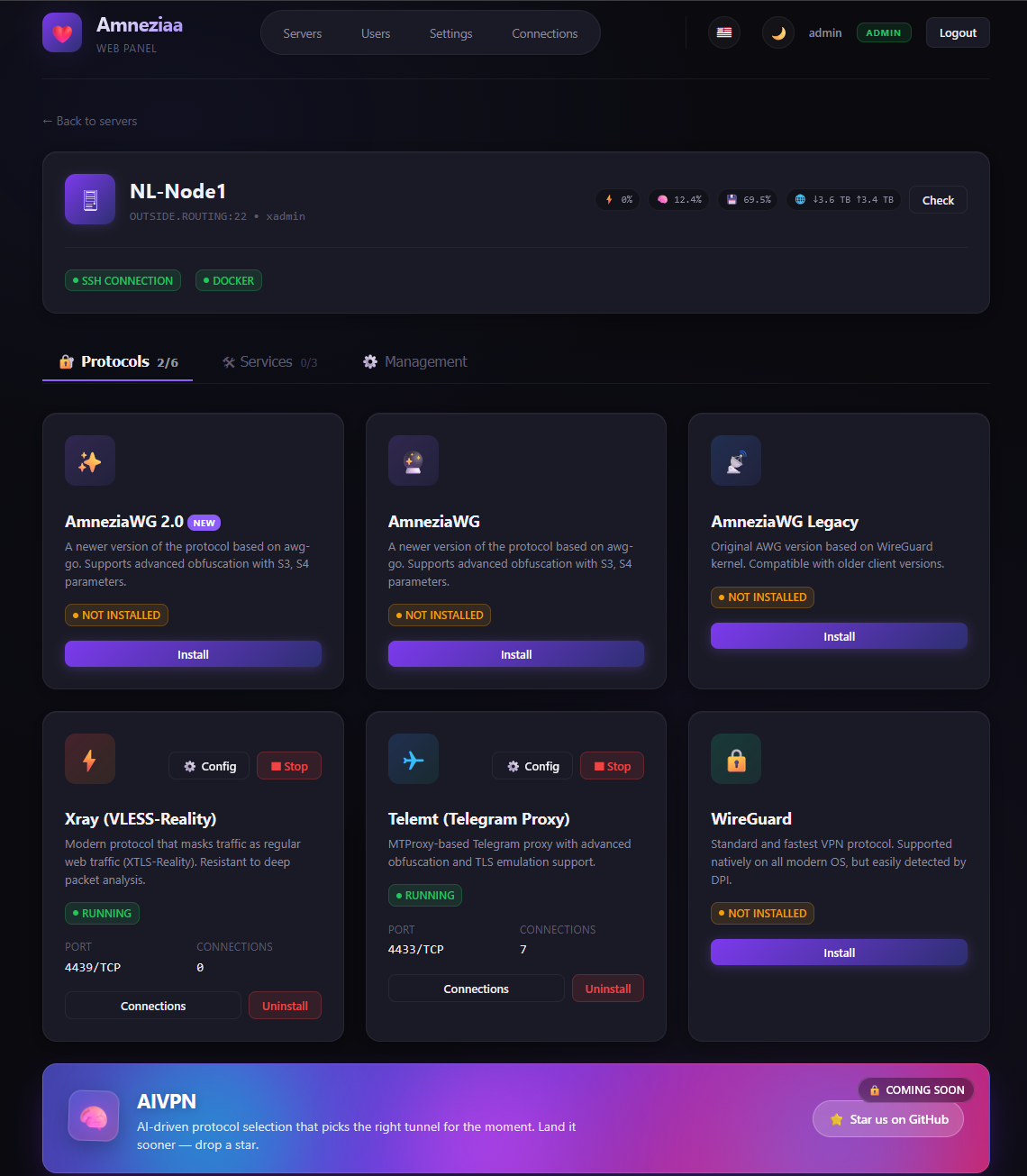
### Additional Sections
👥 Users Management (click to expand)
User management interface with permissions and access controls:

⚙️ System Settings (click to expand)
Configuration panel for system parameters and preferences:

## 🚀 Key Features
* **⚡ VPN Protocols**:
* **AmneziaWG (AWG / AWG 2.0 / AWG Legacy)**: Advanced WireGuard-based protocol with S3/S4 obfuscation to bypass deep packet inspection (DPI). Three coexisting variants — modern AWG 2.0 with full junk-packet masking, and a legacy variant for older clients.
* **Classic WireGuard**: Standard, high-performance WireGuard protocol for unmatched speed and broad device compatibility with traffic monitoring support.
* **Xray (XTLS-Reality)**: Stealthy protocol that masks VPN traffic as standard HTTPS browsing. Pinned to **Xray-core v26.x**; transparently reads both the **panel layout** (`meta.json` + `clientsTable.json`) and the **native Amnezia client layout** (`xray_*.key` files + `clientsTable`), so a node first installed via the official mobile/desktop app can be attached to the panel without re-installation.
* **Hysteria 2**: QUIC/HTTP3 proxy from [apernet/hysteria](https://github.com/apernet/hysteria) via `tobyxdd/hysteria:v2` — Let's Encrypt TLS, salamander obfuscation, password auth, `hy2://` share links. Per-server SSL domain/email defaults, renew from settings; install requires free TCP **80** and **443**.
* **NaiveProxy** (stable): HTTPS/HTTP2 camouflage proxy via [klzgrad/naiveproxy](https://github.com/klzgrad/naiveproxy) (Caddy + [klzgrad/forwardproxy](https://github.com/klzgrad/forwardproxy) naïve fork). ACME TLS on the domain, per-client basic auth, `naive+https://` share links. Requires free TCP **80** and **443**. **Use Karing** as the client — do **not** use v2rayN; other clients are untested.
* **Telemt (Telegram MTProxy)**: High-performance Telegram MTProxy with TLS emulation and comprehensive management (quotas, IP limits, real-time session tracking). Robust install path that auto-configures Docker's official apt/yum repository when needed.
* **Cloudflare WARP**: Add and manage WARP-powered connectivity from the panel for routing and network flexibility.
* **🛠 Services**:
* **AmneziaDNS**: Internal DNS resolver on a private docker network (`amnezia-dns-net`, IP `172.29.172.254`) to prevent DNS leaks and blockings.
* **AdGuard Home**: DNS-based ad blocker with a web admin UI. Two install modes: **Replace AmneziaDNS** (takes its IP, all VPN clients use AdGuard immediately) or **Side-by-side** (parallel deployment on `172.29.172.253`, web UI accessible only over the VPN by default). Optional opt-in checkboxes to expose the web UI / DoT / DoH on the host.
* **SOCKS5 Proxy**: Single-account 3proxy-based SOCKS5 server modelled after the official Amnezia client. Auto-generated 16-character password on install, port and credentials editable later from the panel without re-install.
* **NGINX + Let's Encrypt**: Reverse-proxy and HTTPS automation with certificate management for secure public endpoints.
* **⚙️ Core Server Management**:
* **Add / Edit / Delete / Reorder** server entries — drag-and-drop reorder updates `server_id` references in saved connections automatically.
* **Per-server SSL defaults**: optional domain + Let's Encrypt email on each server, pre-filled when installing Hysteria or NGINX.
* **Live ping indicator** next to each server name — non-blocking TCP-connect probe to the SSH port, runs on the asyncio loop in parallel for all servers.
* **Clear server** wipes every Amnezia-related container, image and `/opt/amnezia` directory in a single sudo script — works for any current or future `amnezia-*` protocol.
* **Reboot** the server directly from the UI.
* Strictly concurrent protocol status polling — all supported protocols/services checked in parallel for immediate feedback.
* **Asynchronous Processing**: Resilient, non-blocking background architecture prevents the UI panel from freezing, even if remote endpoints hang.
* **🔁 Cascade (double VPN)**:
* Route clients through an **entry** AmneziaWG/WireGuard server to an **exit** server (country-block bypass).
* Approach inspired by [ryderams/amneziawg-cascade](https://github.com/ryderams/amneziawg-cascade) (AWG2 entry→exit); applied via panel SSH — **no remote curl|bash** script download.
* Handshake wait + optional egress verify (curl --interface → ifconfig.me); exit return route persisted like ryderams vps2.
* Users keep using the **ENTRY** client config only — do not share the exit cascade peer.
* **🧩 Marketplace & Templates**:
* Market templates provide quick presets for installing and configuring supported protocols and services (including **Hysteria 2**).
* Multi-protocol management lets you run and control multiple protocol instances on the same server.
* **🌐 Internationalization (i18n)**:
* Full support for **English**, **Russian**, **French**, **Chinese**, and **Persian**.
* Native **RTL (Right-to-Left)** support for Persian language.
* **👥 Advanced User Management**:
* Role-based access (Admin, Support, Regular User).
* Traffic limits, status monitoring, and account expiration.
* One-click user enabling/disabling.
* **🎨 Premium UI/UX**:
* Stunning glassmorphism design.
* Dynamic **Dark/Light** mode transition.
* Fully responsive for mobile and desktop.
* **🤖 Telegram Bot Integration**:
* Notify users about new connections or limits.
* Integrated management via Telegram commands.
* Admin-role workflows for managing servers, protocols, users, and connections directly from Telegram.
* **🔄 Built-in Update Checker**:
* View your current panel version directly in Settings.
* One-click check for fresh GitHub releases to stay up to date.
* **📤 Data Interoperability**:
* **Remnawave Sync**: Automatically import and sync users from Remnawave.
* **Simple Backup**: Effortless JSON-based export and restore of all panel data.
* **Backup / Migrate protocols (Alpha)**: Move protocol configurations between nodes for maintenance, recovery, and migration workflows.
* **🔗 Public Sharing**:
* Generate password-protected links for users to download their configurations without panel access.
* **🌍 One-click Public Tunnels**:
* Open the local panel to the internet from `/settings` using **Cloudflare Quick Tunnel** or **ngrok**.
* Shows the local server URL, installation state, running state, and issued public HTTPS URLs directly in the UI.
* Supports one-click install, enable, stop, and delete for panel-managed tunnel binaries.
* Persists tunnel PID/public URL state across panel restarts and can detect already running tunnel processes.
* Works on Windows, Linux, and Docker-friendly environments; `TUNNEL_BIN_DIR` and `TUNNEL_STATE_FILE` can override binary/state locations.
* **🔑 API Tokens for External Integrations**:
* Issue bearer tokens from `/settings` for CI bots, monitoring, or any third-party service.
* Panel never stores the raw token — only its SHA-256 hash. The full value is shown **once** at creation; lose it and you must rotate.
* Tokens inherit the role of the admin who created them and are revoked automatically if that user is disabled or demoted.
* Send `Authorization: Bearer ` with any admin endpoint — every endpoint that accepts a session also accepts a token, no other changes.
## 💡 Need Additional Functionality?
If you require any custom features not currently available in the panel, **let us know – we'll implement them quickly!**
* **Database Support**: PostgreSQL, MySQL/MariaDB, SQLite, Oracle, and MS SQL Server
* **In-Panel File Editor**: Edit configuration files inside containers directly from the web interface
* **Advanced backup automation**: Scheduled backups, external storage, and richer recovery workflows
* **Advanced protocol migration**: Extended migration tooling for complex multi-node setups
* **Xray Self-Steal Mode**: Advanced Xray configuration with self-steal functionality
* **And much more!**
**Or better yet, contribute!**
## 🏗 Prerequisites
* **Python 3.10+**
* Target servers: **Ubuntu 20.04/22.04/24.04** (Architecture: x86_64 or ARM64).
* SSH access to target servers (Password or Private Key).
## 📦 Installation
1. **Clone the repository**:
```bash
git clone https://github.com/PRVTPRO/Amnezia-Web-Panel.git
cd Amnezia-Web-Panel
```
2. **Set up Virtual Environment**:
```bash
python -m venv venv
source venv/bin/activate # Windows: venv\Scripts\activate
```
3. **Install Dependencies**:
```bash
pip install -r requirements.txt
```
## 🚀 Getting Started
Launch the application:
```bash
python app.py
```
The panel will be accessible at `http://localhost:5000`.
## 📦 Installation Method 2
Download and run the executable file for your system.
```
Windows
Linux
Mac
```
## 🐳 Docker
**Quick start (panel + PostgreSQL 17):**
```bash
cp .env.example .env
# set SECRET_KEY and strong POSTGRES_PASSWORD in .env
docker compose up -d --build
```
Panel: `http://localhost:5000` (or `APP_PORT` from `.env`).
| File | Purpose |
| --- | --- |
| `Dockerfile` | Production image (Python 3.12) |
| `docker-compose.yml` | Panel + PostgreSQL with healthchecks |
| `.env.example` | Environment template |
**Environment**
| Variable | Default | Description |
| --- | --- | --- |
| `APP_PORT` | `5000` | Host port / in-container listen port |
| `SECRET_KEY` | (random) | Session signing key — set in production |
| `DATABASE_URL` | compose DSN | PostgreSQL connection string |
| `POSTGRES_*` | `amnezia` | DB credentials for the `db` service |
Prebuilt Hub image (upstream): https://hub.docker.com/r/prvtpro/amnezia-panel
### Initial Login
* **Username**: `admin`
* **Password**: `admin`
> [!IMPORTANT]
> Secure your panel by changing the default password in the **Users** section immediately after first login.
## 🔁 CI/CD
GitHub Actions workflows in `.github/workflows/`:
| Workflow | Trigger | What it does |
| --- | --- | --- |
| `ci.yml` | push / PR to `main` | Validate translations, `compileall`, Docker build smoke |
| `docker.yml` | push to `main` / tags `v*` | Build & push image to GHCR (`ghcr.io//`) |
| `build.yml` | push / tags `v*` | PyInstaller binaries (Linux / Windows / macOS) + release assets |
## 📋 Fix / changelog (this fork)
### v2.2.1
* **Cascade egress verify fix**: bind curl to ENTRY `awg0`/`wg0` IP (client-subnet policy route), not cascade peer Address.
* Soft-warn (no rollback) when policy route via `cascade` is OK but public-IP echo services fail.
### v2.2.0
* **Cascade (double VPN) restored** — stable entry→exit tunnel for AmneziaWG / WireGuard.
* Inspired by [ryderams/amneziawg-cascade](https://github.com/ryderams/amneziawg-cascade); logic runs over panel SSH (**no remote curl|bash**).
* Safety: require exit **handshake** when enabled; optional **egress verify**; subnet conflict check; exit `/32` return route with start.sh markers.
* UI on the server page with per-step settings (pin exit route, MSS clamp, verify egress, …). Defaults prefer **awg2**.
### v2.1.0
* **NaiveProxy — stable**: production-ready install (Caddy + klzgrad/forwardproxy), share links always include `:443`.
* **Client notes (important)**:
* **Do not use v2rayN** with NaiveProxy (broken DNS/IPv6 behaviour → latency −1 ms even when the server is fine).
* **Karing** — confirmed working.
* Other clients — untested / use at your own risk.
* Share-link and config UI hints updated accordingly.
### v2.0.0-beta
* **NaiveProxy** (Beta): install [klzgrad/naiveproxy](https://github.com/klzgrad/naiveproxy) server via Caddy + naïve [forwardproxy](https://github.com/klzgrad/forwardproxy) — domain TLS (ACME), per-client basic auth, `naive+https://` share links.
* Marketplace / server page / users / invites / Telegram / backups include NaiveProxy.
* Install warns that free TCP **80** and **443** are required; uses per-server SSL domain/email defaults when set.
* Official prebuilt Caddy on amd64; xcaddy build path for other arches.
* Version line bumped to **2.0 Beta** (`v2.0.0-beta`).
### v1.8.0
* **Hysteria 2** fully wired in marketplace, server page, users/invites, Telegram bot, and backups.
* **Per-server SSL defaults**: set domain + Let's Encrypt email when adding/editing a server; values pre-fill Hysteria (and NGINX) install forms.
* **SSL renew**: change domain or use “Renew SSL” in Hysteria settings to re-issue the certificate (needs free TCP 80).
* **Install warning**: free TCP ports **80** and **443** required for stable Let's Encrypt / HTTPS-QUIC operation.
* Official image `tobyxdd/hysteria:v2`, salamander obfs, password auth, `hy2://` share links, selectable UDP listen port.
### v1.7.0
* **Clearer create flow**: pick **server first**, then **protocol** (WireGuard, AmneziaWG 2.0, …) — invites, guest access, and user connections no longer dump everything into one messy list.
* Protocol titles are human-readable and ordered (AWG 2.0 → AWG → Legacy → WireGuard → Xray → Telemt → Hysteria).
* 3x-ui is a separate “server” choice; VLESS inbounds still load from that panel’s API.
* **Hysteria 2** manager restored ([apernet/hysteria](https://github.com/apernet/hysteria)) — see **v1.8.0** for full panel integration.
### v1.6.0
* **3x-ui multi-panel**: register several 3x-ui servers in Settings; pick a panel and load VLESS inbounds over its API when creating users/invites (share link comes from 3x-ui).
* **Docker / CI**: refreshed `Dockerfile` + compose, `.env.example`, CI checks, GHCR image workflow.
* **Cascade** was temporarily removed in this release (redesigned and restored in **v2.2.0**).
* **WG/AWG backups**: ZIP export of client `.conf` + restore with loading feedback.
* **API performance**: in-memory data cache, faster server check/stats.
* **Share / guest**: one-tap “Copy key”.
* **User expiration**: countdown can start on first config use; UTC-safe comparisons.
* **UI**: shared SVG icon system.
## 🔧 Project Details
### API Documentation
The project includes self-documenting API endpoints, organised into clear tag groups:
* **Swagger UI**: `/docs`
* **ReDoc**: `/redoc` (pinned to a stable bundle, Google Fonts disabled — works on networks where they're blocked)
Routes are grouped in the docs as:
| Group | Purpose |
| --- | --- |
| **System Templates** | HTML pages served to browsers (login, server detail, settings, /share). Not part of the JSON API. |
| **Authentication** | Login, captcha, session lifecycle. |
| **Servers** | Server inventory & host-level operations (add/edit/delete, ping, reorder, reboot, clear, stats). |
| **Protocols** | Install / uninstall / container / raw-config editing for every protocol & service on a server. |
| **Connections** | Per-protocol VPN client connections (CRUD, enable/disable, fetch config). |
| **Users** | Panel user accounts and the connections assigned to them. |
| **Self-service** | Endpoints called by a regular user for their own data (`/api/my/*`). |
| **Sharing** | Public, token-protected configuration sharing — no panel session required. |
| **Settings** | Panel-wide settings, Telegram bot, Remnawave sync, JSON backup/restore. |
| **API Tokens** | Create and revoke bearer tokens for external integrations. |
**Authentication for external integrations** — both session cookies and `Authorization: Bearer ` are accepted on every admin endpoint. Example:
```bash
TOKEN="awp_xxxxxxxxxxxxxxxxxxxxxxxxxxxxxxxx"
# List panel users
curl -H "Authorization: Bearer $TOKEN" http://your-panel:5000/api/users
# Add a server
curl -X POST -H "Authorization: Bearer $TOKEN" -H "Content-Type: application/json" \
-d '{"host":"1.2.3.4","username":"root","password":"...","name":"new-srv"}' \
http://your-panel:5000/api/servers/add
# Cheap reachability probe for monitoring
curl -H "Authorization: Bearer $TOKEN" http://your-panel:5000/api/servers/0/ping
```
### Technology Stack
* **Backend**: FastAPI (Python), `asyncio` for concurrent SSH/probe work
* **Frontend**: Vanilla JS, Jinja2, Custom CSS (Glassmorphism, full set of CSS animations for promo blocks)
* **Database**: PostgreSQL 17 (`DATABASE_URL`) with a dict-compatible store API (`db/`)
* **SSH Engine**: Paramiko
* **Deploy**: Docker Compose (panel + Postgres), optional GHCR image via CI
### Project Structure
```
web-panel/
├── app.py # FastAPI entry point + all routes
├── telegram_bot.py # Optional Telegram bot integration
├── db/ # PostgreSQL store + schema helpers
├── managers/ # Protocol & service managers (one file per protocol)
│ ├── ssh_manager.py # SSH abstraction (Paramiko wrapper)
│ ├── awg_manager.py # AmneziaWG / AWG 2.0 / AWG Legacy
│ ├── wireguard_manager.py # Classic WireGuard
│ ├── xray_manager.py # Xray-core (VLESS-Reality)
│ ├── hysteria_manager.py # Hysteria 2 (apernet/hysteria)
│ ├── naiveproxy_manager.py # NaiveProxy (Caddy + klzgrad/forwardproxy)
│ ├── telemt_manager.py # Telegram MTProxy
│ ├── dns_manager.py # AmneziaDNS (Unbound)
│ ├── adguard_manager.py # AdGuard Home
│ ├── socks5_manager.py # 3proxy-based SOCKS5
│ └── backup_manager.py # Protocol backup / restore on remote hosts
├── static/ # CSS / favicon / vendored JS
├── templates/ # Jinja2 templates
├── translations/ # en / ru / fr / zh / fa
├── Dockerfile # Panel image
├── docker-compose.yml # Panel + PostgreSQL
└── .github/workflows/ # CI, Docker publish, binary builds
```
## 🛡 Security Recommendations
* **Reverse Proxy**: It is highly recommended to run the panel behind Nginx/Apache with an SSL certificate.
* **SSH Keys**: Use SSH keys rather than passwords for connecting to your VPN servers.
* **Secret Key**: Set a custom `SECRET_KEY` environment variable for secure session management.
* **API Tokens**: Treat each token like a password — store it in your integration's secret manager. Revoke it from `/settings` if it leaks or the integration is decommissioned. Rotate periodically; tokens inherit admin rights.
## 🤝 Contributing
Contributions are welcome! Please feel free to submit Pull Requests or open Issues for feature requests and bug reports.
## 📄 License
This project is licensed under the **GNU General Public License v3.0** - see the [LICENSE](../LICENSE) file for details.
---
*Built with ❤️ for the Amnezia community.*